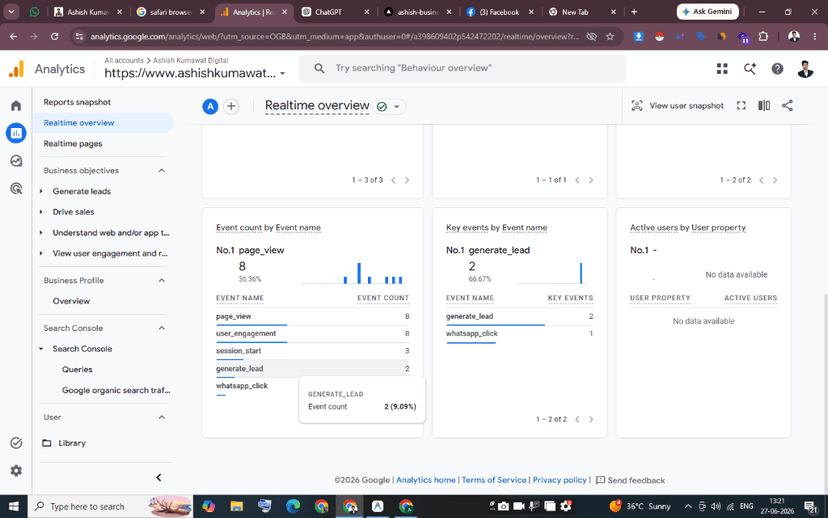
For modern lead-generation websites and performance marketing campaigns, tracking simple pageviews is no longer enough. If your primary customer action is a WhatsApp chat initiation or a contact form submission, counting raw visits will not tell you which ads are driving revenue. Traditional tracking relied on redirecting users to a static 'thank you' page. However, in 2026, dynamic buttons, single-page React applications (like Next.js), and floating chat widgets make page redirection obsolete. To calculate your exact Return on Ad Spend (ROAS) for Meta Ads and Google Ads campaigns, you must track user actions directly. In this conversion optimization case study, we document the exact step-by-step framework used by Ashish Kumawat—a certified Global Performance Marketing Consultant and Analytics Expert in Jaipur, India—to set up event-based custom conversions in Google Analytics 4 (GA4) using Google Tag Manager (GTM).
Step 1: Identifying Active Conversion Triggers on Your Site
Before configuring tags, you must audit the interactive elements on your website that constitute a lead. On ashishkumawat.com, we identified two primary conversion channels: a custom contact/lead form and a floating WhatsApp widget in the bottom-right corner. The floating WhatsApp button is critical for mobile traffic, especially for local service providers in Jaipur's commercial sectors like Vaishali Nagar, C-Scheme, Malviya Nagar, and Mansarovar, where immediate communication is preferred. Since clicking the WhatsApp icon opens an external application (wa.me), client-side browser cookies cannot track what happens after the click. Therefore, capturing the click event itself as a lead trigger is essential to register customer intent: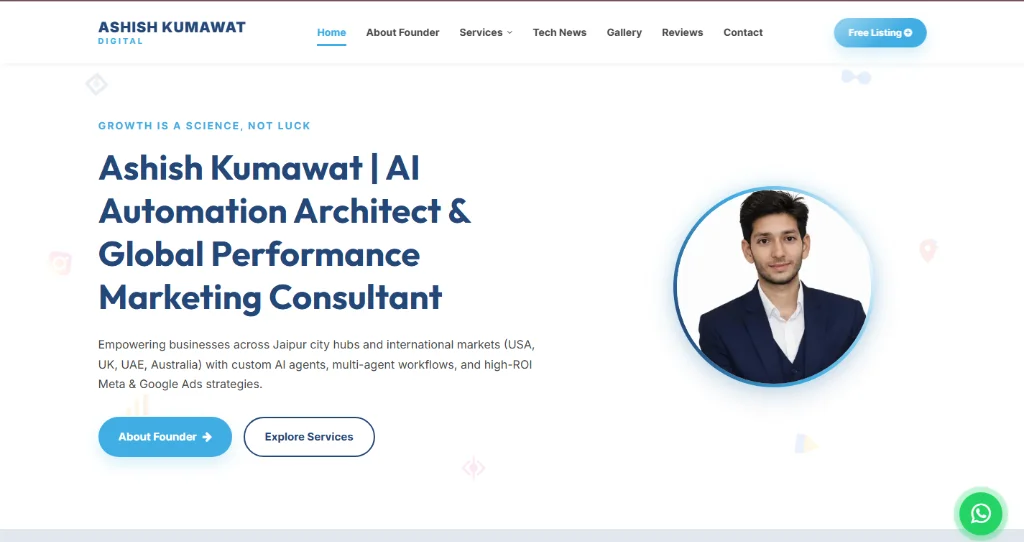
Step 2: Triggering GA4 and Meta Pixel Tags via GTM Preview
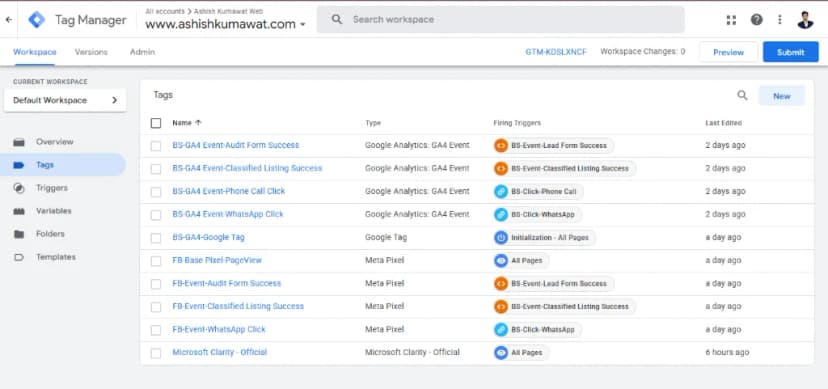
To track the WhatsApp button click, we configured a Link Click trigger in Google Tag Manager. The trigger is set to fire when a user clicks a URL containing wa.me or api.whatsapp.com. In GTM, we created two separate event tags linked to this trigger: a GA4 Event Tag (passing event name whatsapp_click) and a Meta Pixel Custom Event Tag. To verify that our tags fire correctly without duplicates, we initiated a test session using Google Tag Assistant. Clicking the WhatsApp icon immediately triggers the click event, firing both the GA4 event tag and the Facebook Pixel tag successfully. This setup guarantees that both Google Ads and Meta Ads dashboards receive instant, clean conversion signals: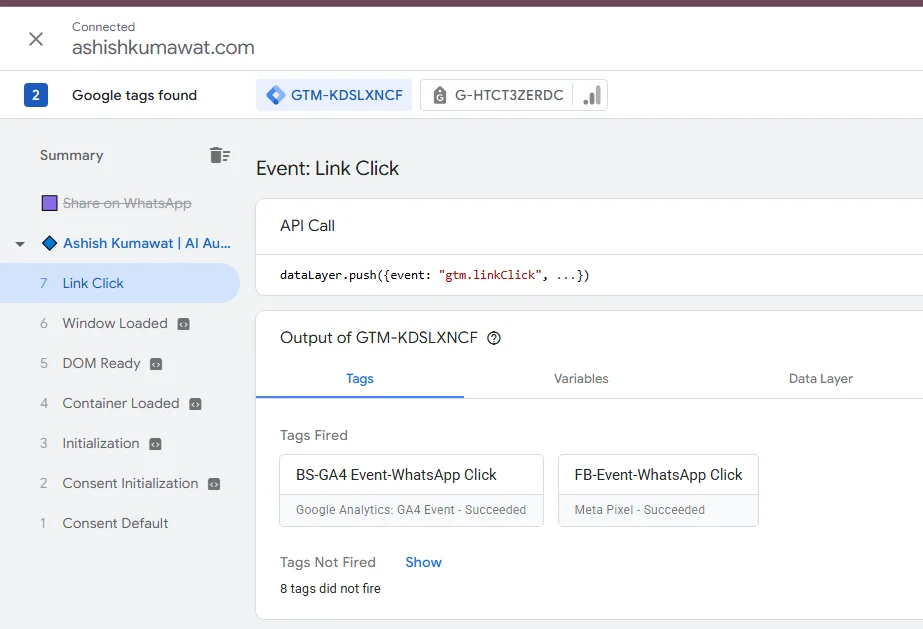
Step 3: Registering and Toggling Key Events in GA4 Admin
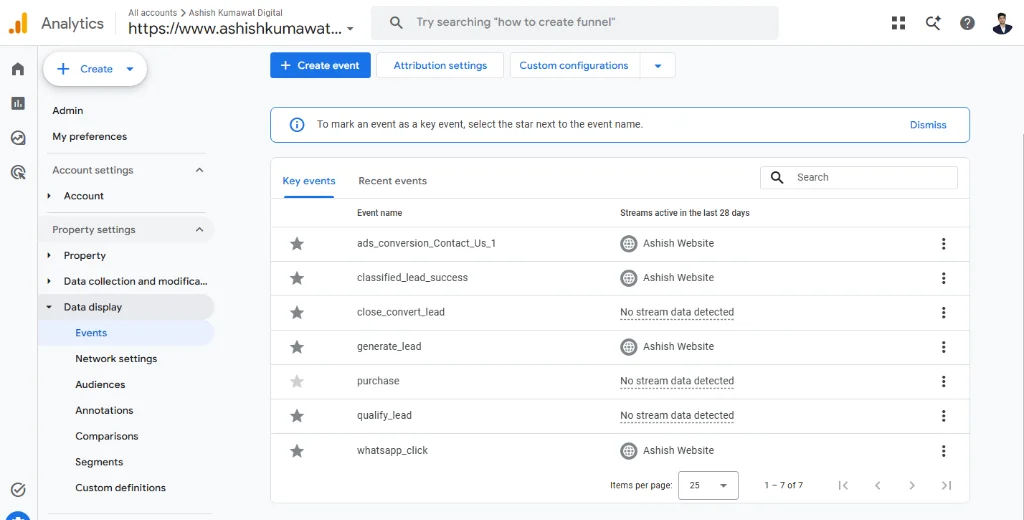
Once GTM sends the whatsapp_click and generate_lead events, they appear in the GA4 Events list under Data Display. By default, GA4 treats them as normal events. To elevate them to conversions, we must register them as Key Events (formerly known as Conversions). In the GA4 Admin panel under Data Display, we toggle the star next to whatsapp_click and generate_lead. This instructs GA4 to treat these events as conversions. Consequently, these events will populate the Conversions reports, allowing us to attribute lead volume directly to traffic channels (Organic Search, Paid Search, Paid Social, Referrals):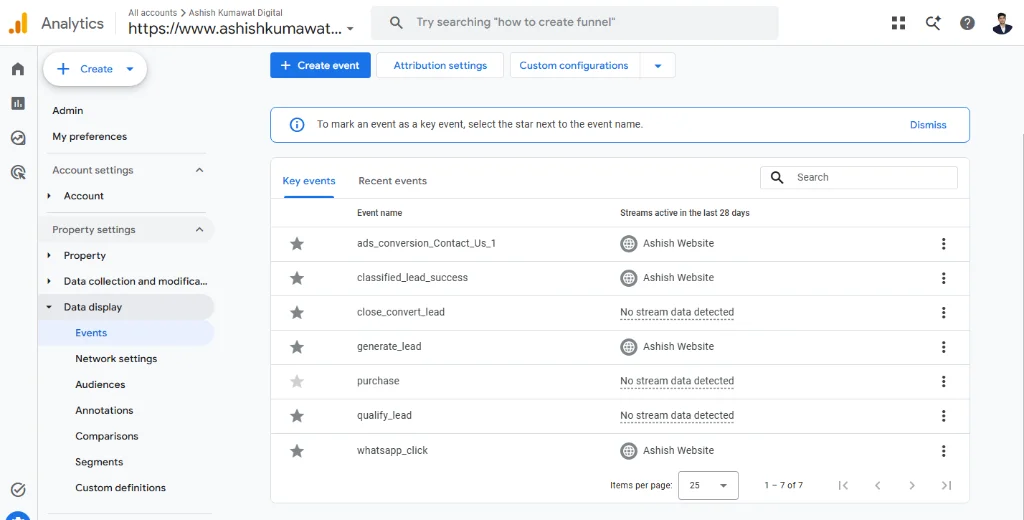
How Clean Conversion Data Multiplies Your Ad Campaigns ROI
Why is this custom conversion setup so critical? Paid ad algorithms (like Google Smart Bidding and Meta Advantage+ campaigns) rely entirely on conversion data to optimize their targeting. If your tracking is broken or double-counting leads, the AI will optimize for the wrong audience, wasting your budget. With a clean, event-based GA4 and GTM tracking setup, the advertising platforms learn exactly which demographic profiles, search keywords, and creatives generate actual WhatsApp chats and form leads. If you want to scale your business globally—targeting high-value markets in the USA, UK, Canada, Australia, and Dubai—having verified conversion tracking is your unfair competitive advantage. As an Advanced Analytics & Performance Marketing Expert, I build high-converting setups that drive sales. Book your free digital audit today and let's optimize your marketing data.